
Spend Management: The Complete Guide for Finance and HR Teams [2026]
Master spend management 2026. Learn how Saudi finance teams automate corporate spending, including travel, vendor bills, and petty cash, with VAT compliance.

Author: Mohammad Rafat
Category: Payroll Management
Published on: 15 October 2026
Share this blog with your colleagues
Every company knows exactly what’s coming in. But do you know where your money is going out?
Businesses today are expected to move fast on everything, decisions, hiring, operations, procurement. That speed puts pressure on budgets and makes managing spend the old way, through emails and spreadsheets, more complex than ever. The cost shows up as lost efficiency, lost productivity, and ultimately lost profit.
In this guide, we break down what spend management is, why Saudi companies in particular need it, and how teams move from manual processes to end-to-end automation, so they gain full control and visibility over every financial operation.
What is Spend Management?
Spend management is the process of tracking, monitoring, analyzing, and controlling all of your company’s spending, making sure every Riyal goes to the right place and delivers real value. It covers the entire spend cycle, from purchase and spend requests through invoice management, payment, reconciliation, and record auditing, so you can answer three critical questions: Who is spending? On what? And is every transaction within policy and budget?
The 6 Core Processes in Any Modern Spend Management System
- Purchase or spend requests: The process starts when a need for a purchase or expense is identified. The request is submitted through a clear workflow that defines its purpose and expected cost.
- Approvals: Each request is automatically routed to the right approvers based on approved policies and budget, speeding up sign-off while preserving internal controls.
- Expense management: Employees can easily submit expenses for review and approval, while actual spend is tracked against policies and budget.
- Invoice processing: Vendor bills, receipt uploads, matching, and review are organized in one structured flow.
- Reimbursements and payments: Approved amounts are paid out to employees via bank transfer or directly through payroll.
- Accounting reconciliation and analysis: Once payments are made, the system matches every transaction against bank statements, assigns it to the correct accounts, and posts it to your accounting system.
Spend Management vs. Expense Management: What's the Difference?
The two terms are often used interchangeably, but there’s an essential difference. Expense management focuses on tracking, collecting, and reconciling the receipts and invoices employees pay out of pocket for work and later claim back. Spend management is much broader: it covers the company’s entire spending operation, including managing and reimbursing employee expenses, business travel, vendor bills, purchase requests, and petty cash, along with spend policies, budgets, and analytics. In short, expense management is one piece of spend management, the larger umbrella that controls all company spending from start to finish.
Payroll and Spend
Many companies blur an important distinction: salary is personal money, spend is company money. A salary is what an employee earns for their work; it becomes theirs the moment it’s due. Spend is company money an employee pays out on the company’s behalf: a flight ticket, a vendor bill, a business lunch. Each needs different controls. Payroll demands accuracy and on-time delivery; spend demands policies, approvals, and documentation.
Who Owns Spend Management in a Company?
Spend management isn’t the job of a single department; it’s a shared function that runs across the entire company. It starts with Finance, which sets budgets and monitors compliance with them; extends to HR, which connects expenses to employee policies and allowances; and includes managers, who approve their teams’ requests and follow up with other departments.
Common Spend Management Challenges
As financial operations grow, keeping track of company spending gets harder, and problems like these start to surface:
1. No clear picture of spend
One of the most common problems is spend data and reports scattered across multiple systems and accounts. Finance teams lose their grip on the budget and struggle to anticipate, or even detect, unnecessary and duplicate expenses.
This gap is widespread: in a 2023 study by Forrester Consulting commissioned by SAP Concur, 61% of finance and IT leaders said their financial leadership lacks sufficient visibility into near-real-time employee spend data.
2. Too many manual processes
Many companies still manage expenses the old way: collecting receipts, reviewing them, keying in data, and chasing approvals. That eats up time, multiplies the chance of error, and delays requests and reimbursements for employees and vendors alike, hurting the company in the long run.
3. Difficulty enforcing financial policies
As the company grows, with more departments and more employees, policies get harder to enforce. Spend limits get exceeded, policies get applied differently from one department to another, exceptions pile up and become hard to track, and in some cases outright embezzlement occurs, along with growing compliance risk.
The scale of that last risk is well documented: the Association of Certified Fraud Examiners (ACFE) estimates that organizations lose 5% of revenue to fraud every year.
4. Weak budget control and financial planning
Budget management depends heavily on current, accurate data. When information arrives late or incomplete, financial planning becomes guesswork. You can’t forecast future expenses, analyze spending trends and patterns, or act quickly when budgets are about to be exceeded.
5. A frustrating experience for employees
When submitting expenses or requesting approvals is complicated, employees look for workarounds: side conversations, a return to old habits, or simply putting the task off. The result: expenses become harder to track, data ends up missing or inaccurate, and finance teams face a flood of questions and manual follow-up that doubles their workload. HR feels it too. When travel and reimbursements run on chat messages and spreadsheets, HR becomes the default coordinator for every trip and every late claim, work that adds hours without adding control.
What is spend management software?
Spend management software is a digital system for tracking and controlling every spending operation from start to finish, from raising and approving spend requests through payment, reconciliation, and posting to the accounting records, all in one place. It gives you a clear, accurate picture of how much your company spends and on what.
Processing begins the moment an employee submits a claim or an invoice. The system automatically reviews the request against your defined policies and permission levels; if it needs approval, it routes it straight to the right person or team. After the transaction, the system captures and categorizes the expense, invoice, and receipt data, then sends it to your accounting system for reconciliation.
Why Do Companies Need a Spend Management System?
Companies make dozens of spending decisions every day. Without a system to keep them in check, those decisions pile up into a silent financial leak, draining resources unnoticed and creating problem after problem. That’s why automating spend management delivers benefits like these:
1. Clearer visibility into spend
The first step in spend management is knowing where money is actually going and who’s spending it. With manual methods, that data is scattered across emails, invoices, files, and systems, and clarity usually arrives only after month-end or when the books close. With a system in place, finance teams and leadership get the right answers at the right time, early enough to step in and act:
- How much have we spent so far?
- Which department is about to exceed its budget?
- Has spending with any vendor spiked unusually?
- Were any expenses made outside policy?
- Are there recurring line items with no clear value?
2. Control before the money is spent, not after
The problem with traditional, manual management is that oversight comes after the money is gone. The employee buys, then submits the receipt, and only then does Finance start checking whether the expense was allowed. You end up trying to fix a mistake that’s already happened. Automation flips that sequence: the spend management system reviews the request before approval, checking the spend limit, the employee’s permissions, the expense type, and the required approval workflow. If a request doesn’t comply with policy, the system stops it or routes it down the right path, preventing conflicts of interest and misuse before they occur.
3. Time and effort saved
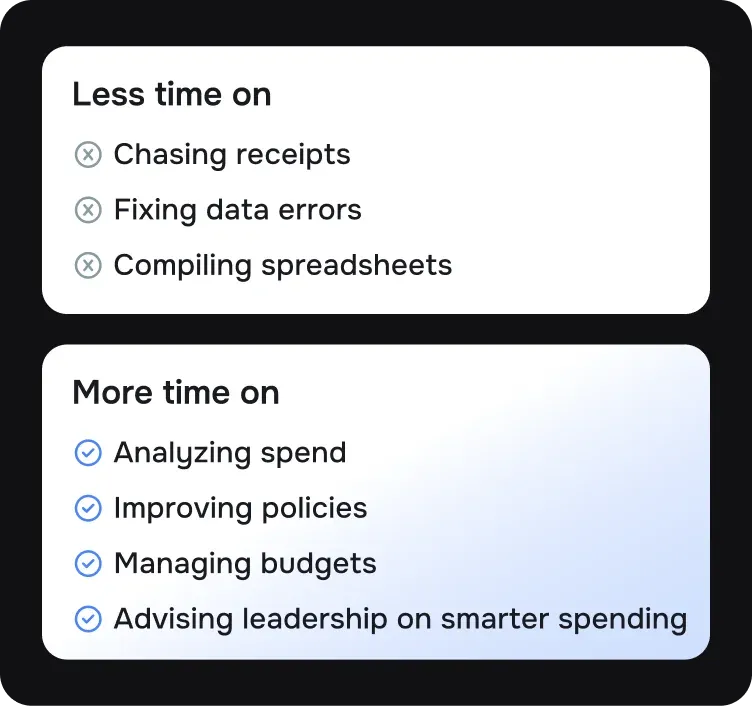
Managing spend manually burns hours on repetitive tasks: collecting receipts, entering data, categorizing expenses, matching invoices, chasing approvals, and preparing journal entries. And every step adds another chance for error: a receipt goes missing, a number gets typed wrong, an invoice is recorded twice, an expense lands under the wrong category.
A spend and expense management system takes that burden off your team. It simplifies capturing receipt and invoice data, categorizes expense types and line items, matches invoices, and routes everything straight into the right approval workflow, all connected to your accounting or ERP system, so the data is ready for review and posting, faster and cleaner.
The Global Business Travel Association (GBTA) estimates that processing a single expense report costs $58 and 20 minutes of working time.
4. A faster financial close
In many companies, month-end close is exhausting because so much of the work starts late: missing receipts, uncategorized invoices, transactions awaiting matching, approvals never completed. When spend management is automated from the start, data is recorded the moment a transaction happens, categorization happens early, approvals are documented, and invoices are linked directly to requests and purchase orders. Close, review, and reconciliation all move faster, because the finance team isn’t starting from zero at month-end; much of the work is already done automatically.
5. Stronger policy and regulatory compliance
In Saudi Arabia, spend management isn’t only about internal controls. It’s also tied to e-invoicing regulations, VAT, invoice retention, and clear documentation of every transaction. When invoices and receipts are scattered across multiple places, the risk of losing key documents or recording incomplete data goes up, which can compromise the accuracy of financial reports, weaken the company’s ability to substantiate expenses, and cost it eligible input VAT recovery (the VAT paid on purchases).
Automated spend management builds a clear record for every spending transaction, making it easy to trace each one from start to finish, store the supporting documents, match invoices to requests and purchase orders, review exceptions and approvals, and produce a clean audit trail whenever it’s needed. And for companies working with government or semi-government entities, a spend management system can support additional standards, such as approved vendor lists and local content requirements, within purchasing decisions.
6. Better vendor management
One of the biggest benefits of automating spend management is that it reveals the true picture of your vendor relationships. With the old ways, companies discover too late that they’re buying the same service from multiple vendors, or that each department works with a different vendor without standardized pricing or clear contracts, weakening the company’s negotiating position, multiplying invoices, adding manual follow-up, and making vendor evaluation harder.
When spend data is unified, finance and procurement teams can see which vendors account for the most spend and how much is going to each one. Are there recurring purchases that could be consolidated? Vendors that are underperforming? Contracts coming up for renewal? Line items worth renegotiating? Having that complete picture in one place cuts down on ad-hoc spend requests and improves relationships with vendors and departments alike.
7. More accurate financial planning
Strategic planning is only as good as the data behind it. If spend data is late or incomplete, budgets and forecasts inevitably rest on a partial picture. Spend management software provides clearer data on actual expenses, spending trends, and your highest-cost categories. Over time, it becomes easy to analyze seasonal patterns, anticipate upcoming commitments, and identify the line items that need tightening or reallocating.
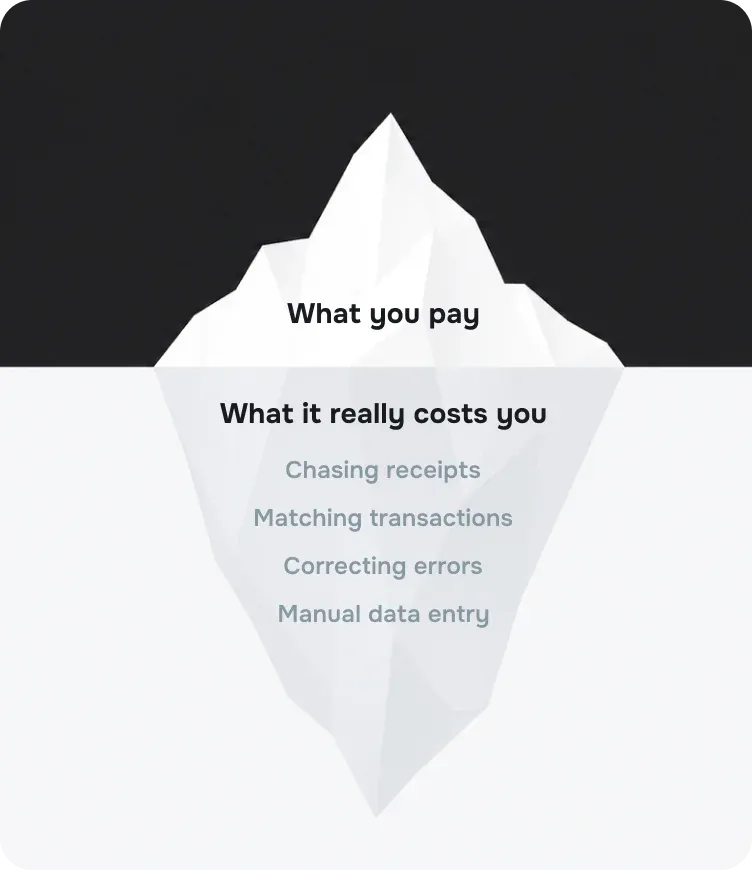
8. Cutting the hidden cost of manual management
The cost of managing spend manually rarely shows up as a line item in the budget, but it’s real. It lives in repeated errors, delays, duplicate payments, incomplete invoices, and missed opportunities to negotiate or recover input VAT. Automation exists to cut that cost. To size it up for your own company, ask:
- How many hours are lost each month collecting invoices and receipts and matching them in the system?
- How many invoices are late every month?
- How many transactions need correcting and chasing?
- How many unnecessary expenses do we only discover when it’s too late?
- How many savings opportunities slip away because of poor visibility and unreliable data?
Manual vs. Automated Spend Management
The Components of Spend Management
Spend management doesn’t cover just one step. It addresses every stage of the spend lifecycle in your company:
1. Employee Expense Management
Expense management begins the moment an employee pays for something work-related and ends when the money is back in their account and the claim is settled. It may look like a simple process, but it’s one of the most sensitive parts of spend management because it directly touches the employee experience: the longer the reimbursement cycle drags on, the more pressure builds on the employee and the more follow-up lands on the finance team.
That pressure is real. In a 2024 survey by Emburse and YouGov, 19% of employees said they had incurred interest on their personal credit cards because their company was slow to reimburse them, and just as many had to postpone personal purchases or payments while waiting for their money.
An employee expense management system streamlines the whole cycle, which typically runs through five key steps:
- Submission. The employee files a claim from anywhere in the mobile app: they snap a photo of the receipt, and AI-powered OCR automatically reads the merchant name, date, amount, and VAT. Receipts can also come in via email forwarding or e-invoices, so all the data is stored in one place from the start.
- Data capture and categorization. The system extracts the receipt or invoice data, assigns the transaction to the right category (travel, hospitality, transportation, and so on), and flags a duplicate receipt the moment it’s submitted a second time.
- Policy checks. Before the request enters the approval cycle, the system verifies whether it complies with company policy. Is the amount within the allowed spend limits? Is this expense type covered? Is the receipt complete? Does it need additional approval?
- Approval routing. If the expense needs sign-off, the system automatically sends it to the right person based on the amount, department, expense category, or permission level, eliminating the delays that come from requests going to the wrong person or getting lost in chat threads.
- Processing and payment. After approval, the expense moves into financial processing. The employee is then reimbursed and the claim settled through the payroll or payments cycle, with status notifications along the way, so they always know whether it was approved, whether anything is missing, and when they’ll be paid.
Managing petty cash and controlling cash spend
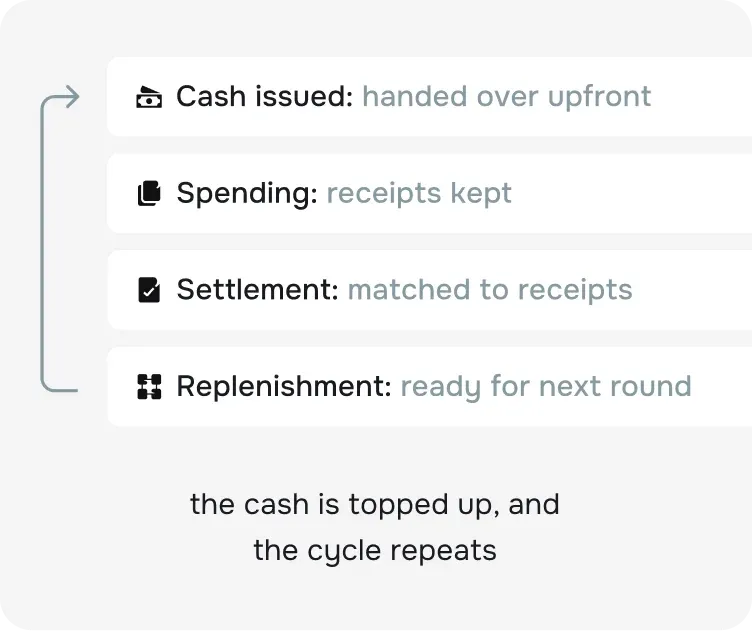
Petty cash covers the small, everyday expenses a company needs handled quickly: transportation, office supplies, light hospitality, or any minor need that would otherwise require a formal purchase request through procurement and finance. The amounts are usually small, but petty cash is one of the hardest expense types to control, because it runs on cash or a custody float (a cash advance entrusted to an employee, who accounts for it with receipts at settlement). It doesn’t always pass through the same controls applied to invoices and larger payments.
The problem usually shows up in traditional petty cash boxes: an amount is handed to an employee or department, spending starts as needs arise, and the expenses are documented later with receipts that may be incomplete, missing, or unclear. Repeat that month after month, and a gap opens between what was actually spent and what the documents can account for. The issue isn’t necessarily bad intent; it’s the absence of a clear, immediate way to document every payout.
Picture a petty cash box holding SAR 5,000, replenished every month. If a few small receipts go missing each week, or amounts get recorded with no clear reason, those little sums add up over time into a figure that’s hard to explain at audit or when closing the books.
How an expense management system keeps petty cash in check
Controlling petty cash matters, but it shouldn’t mean making the process harder for employees. If anything, it should be as simple as possible. An expense management system brings all cash spending under control through features like these:
- Clear spend limits. Each float or department gets a defined balance, with the option to set limits by expense type, employee, or department. When a balance approaches its limit, an alert fires before the overrun happens.
- Instant documentation from a phone. Instead of waiting until the end of the week or month to hand in receipts, employees upload the receipt from their phone the moment they pay. Fewer documents get lost, and every transaction is documented from the start.
- Automatic expense categorization. Every petty cash expense is automatically assigned to the right category (hospitality, transportation, minor maintenance, and so on) and can also be linked to a department, project, or cost center.
- Easier float reconciliation. Instead of a manual settlement at month-end, the system produces a clear statement showing the float balance, what’s been spent, what remains, and what still needs review or missing documentation.
- Better oversight without slowing work down. The goal isn’t to slow down small expenses; it’s to make sure every riyal is spent for a clear, documented reason. The company keeps day-to-day spending fast while closing the gaps, errors, and overruns.
2. Vendor bill management
A large share of company spend never touches an employee’s pocket. It arrives as vendor bills: subscriptions, professional services, utilities, and recurring purchases. Managed manually, the same problems that plague employee expenses repeat themselves at higher stakes: invoices lost between inboxes and desk drawers, duplicate payments slipping through unnoticed, payment status living in one employee’s memory, and an incomplete tax invoice you only discover during a ZATCA review.
Inside a spend management system, every vendor bill moves through a single flow:
- Capture. The bill enters the system by upload, by email, or by scan, with AI-powered OCR automatically reading the vendor name, invoice number, amounts, and VAT.
- Verification. The system confirms the bill is complete as a tax invoice, checks the VAT treatment, matches it against the purchase order or agreed amount, and catches duplicates before they become duplicate payments.
- Approval. The bill runs through a multi-level approval workflow based on amount, department, and category, with every review logged.
- Payment tracking. Payment status, paid or unpaid, is tracked end to end, so vendors get paid accurately and on time, and no one pays the same invoice twice.
- Posting and audit. Approved bills flow into the accounting or ERP system with their categories and cost centers, while supporting documents stay attached: audit-ready records with full policy traceability.
The same flow applies automatically to recurring payments and subscriptions, such as software tools and team licenses. Every renewal is tracked, categorized, and tied to a team or owner. Finance sees usage in real time and can enforce monthly limits, instead of discovering a forgotten subscription a year later.
Corporate cards and spend management
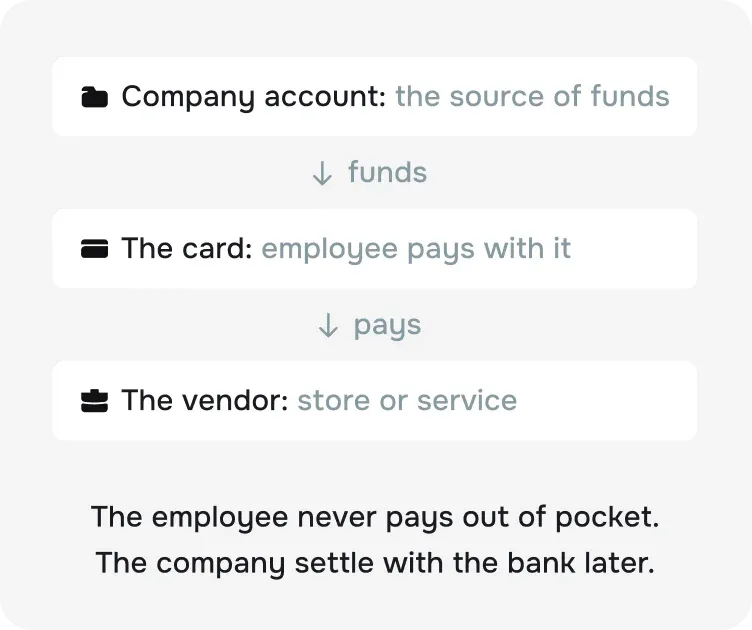
A corporate card is a payment method that lets the company pay directly, instead of the employee paying out of pocket, for quick, recurring purchases like subscriptions and travel bookings.
But a card only handles the moment of payment; it doesn’t govern the spend itself. A card statement is not documentation: a ZATCA-compliant tax invoice is still required, the expense still needs a category and a cost center, and without a request-and-approval layer in front of the card, a card can loosen control rather than tighten it. The control layer of policies, approvals, documentation, and reconciliation is what actually determines whether spending is under control, whatever the payment method.
That layer matters because expense manipulation is common and costly: expense reimbursement fraud schemes account for 13% of occupational fraud cases, with a median loss of $50,000 per case, according to the ACFE’s 2024 report.
3. Employee travel management
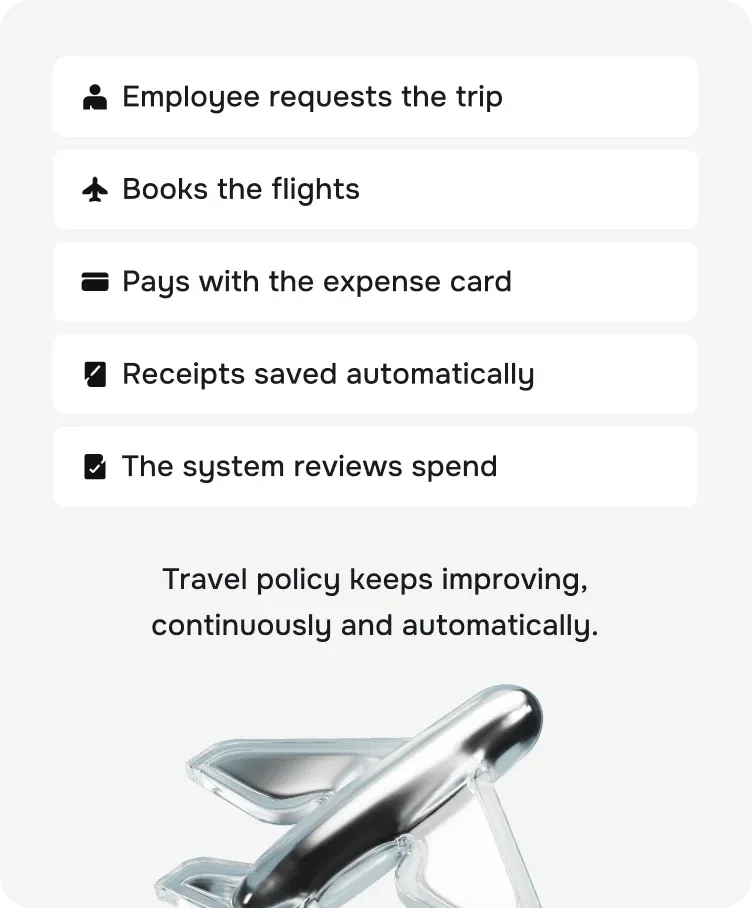
Business travel management is part of the broader spend management system. It starts with the trip request and approval, runs through booking flights and accommodation and covering expenses on the road, and ends with settling the costs and recording them in the books. For companies whose employees travel often, travel and expenses (T&E) is typically the largest controllable spend category after payroll. That’s why it deserves dedicated management rather than being folded into general expenses, since it cuts across multiple categories and spend types.
It’s also the part that causes HR the most stress. In many companies, the HR team ends up working as an “internal travel agent,” juggling travel agencies, spreadsheets, WhatsApp threads, emails, and phone calls just to get a single trip booked, then spending hours at month-end justifying travel costs to Finance with no full context and no audit trail.
The Stages of Business Travel Management
Employee travel management usually runs through five main stages:
1. Trip request and approval: Every trip starts with a request from the employee or their manager covering the reason for travel, destination, duration, expected costs, and the department or project the trip belongs to. This is where pre-approval earns its keep: before anything is booked or spent, the system checks whether the trip is necessary, whether the budget fits, and whether it needs sign-off from a direct manager, a finance manager, or senior leadership, depending on its value.
2. Booking within travel policy: Once approved, booking begins, and the goal isn’t just the lowest price. It’s booking within a clear policy that defines, for example, the travel class by trip length or job level, the hotel cap for each city, when employees may book directly and when they must book through an approved platform or provider, which expenses need extra approval, whether a trip can be extended for personal reasons, and who covers the difference.
3. Expenses during the trip:On the road, employees need to cover a range of expenses: transportation, meals, parking, internet, or work-related operational costs. Companies can choose from several models depending on the nature of the trip, company size, the level of control required, and the employee experience they want to deliver:
- Per diem. The company gives the employee a fixed daily allowance covering meals and incidentals. This model minimizes receipts and paperwork, but needs a clear policy so it doesn’t become a blank check.
- Reimbursement of actual expenses. The employee pays, submits receipts, and is reimbursed after review. This model is the most precise for accounting, but can strain employees financially if payment is slow.
- A bank-issued corporate card. If your company holds cards from its bank, employees can pay with them during the trip. This spares the employee from paying out of pocket, but transactions still need receipts, categorization, and policy review inside the spend management system.
- A travel advance. The company pays the employee an amount up front before the trip, settled after their return. A good fit for certain situations.
4. Expense submission and documentation:The trip doesn’t end at the airport. The part that matters most financially begins when expenses are documented and settled. The manual way: the employee gathers receipts, emails them in, waits for review, and then Finance starts matching expenses against policy, booking, and budget.
In a modern spend management system, the employee uploads the receipt from their phone at the moment of payment, or right after it. The system reads the data, categorizes the expenses, links them to the trip, and checks them against the approved policy, all the way through to settlement.
5. Reconciliation and accounting close:After the trip, what was approved before travel is compared against what was actually spent. The system reviews tickets, hotel, transportation, allowances, incidentals, invoices and receipts, and any overruns or exceptions.
The amount owed to the employee is then approved, the advance settled, or the corporate card transactions matched. The cost is recorded against the correct cost center: the sales department, a specific project, a branch, or an event. The goal: turning travel spend into data you can analyze and forecast, instead of leaving it scattered across receipts and invoices.
How our system helps with T&E (Travel and Expense)
The system connects travel to expense management instead of leaving it as a separate process, helping your company:
- Request and approve trips from one place
- Enforce travel policy before booking and spending
- Tie each trip to a budget and cost center
- Set trip-specific spend limits and budgets
- Upload receipts straight from a phone
- Match expenses against the booking and the policy
- Settle allowances and advances faster
- Record costs in the accounting system
- Analyze travel costs by department or project
4. Spend reports and analytics
You can’t control what you can’t see clearly. Reports and analytics are the layer that pulls every financial operation into a single, clear picture: employee expenses, business travel, petty cash floats, vendor bills, budgets, and approvals. You know where the money goes, who spends the most, on which category, with which vendor, and against which budget. Most importantly, you catch problems early, before they turn into waste, a violation, or a crisis.
KPIs and spend management metrics Every Finance Manager Should Track
Spend Management and Compliance in Saudi Arabia
In Saudi Arabia, spend management doesn’t stop at tracking and approving expenses. The bigger challenge shows up in purchases and invoices, where regulations require you to meet specific standards under the Kingdom’s e-invoicing and tax regimes.
E-Invoicing in Spend Management
The e-invoicing regulations issued by the Zakat, Tax and Customs Authority (ZATCA) require companies to meet specific requirements for issuing, sharing, retaining, and storing invoices. This bears directly on spend management, because incoming expenses and purchase invoices need the same level of documentation, even if the spend management system itself doesn’t issue sales invoices:
- Invoice collection. Instead of waiting until month-end, employees upload the invoice or receipt at the moment of payment, reducing lost documents, especially for travel and small purchases.
- Invoice data extraction. The system reads the vendor name, invoice date, invoice number, pre-tax amount, VAT amount, total, tax registration number where required, and the description of the product or service.
- Flagging incomplete invoices. The system identifies invoices that need review, such as an invoice missing a tax registration number where one is required, an illegible invoice, a receipt that doesn’t show the VAT amount, or an invoice that doesn’t match the amount charged to the card.
- Storage and audit readiness. Every payment gets a clear digital record: who submitted it, when, who approved it, and the invoice attached to it. That record is essential for internal reviews and tax audits alike.
Spend Management and VAT
Recovering eligible input VAT starts with having accurate, complete records of business spending. When receipts and invoices are scattered across emails, spreadsheets, and different systems, Finance teams can struggle to identify eligible VAT, verify supporting documents, and prepare for reconciliation.
Most companies leave this money on the table: a Vanson Bourne study for SAP Concur found that 54% of recoverable VAT is never even claimed.
Jisr Spend helps Finance teams bring travel expenses, employee reimbursements, and vendor invoices into one system. With AI-powered OCR, receipt and invoice data can be captured with less manual entry, while expense categories, spending policies, and approval workflows help teams organize and review transactions consistently.
Jisr Spend also supports VAT-compliant documentation and audit-ready records, with VAT reclaim tracking and reporting capabilities that help Finance teams maintain visibility over eligible spend. Expenses can be tracked by category, department, and cost center, while accounting integrations help reduce manual data entry and keep financial records aligned.
By centralizing spending data, supporting documentation, and approval workflows, Jisr Spend helps Finance teams improve expense reconciliation and maintain more organized records for VAT review. The result is better visibility into company spending and a clearer process for identifying and tracking potentially recoverable VAT, while final VAT eligibility remains subject to applicable regulations and the business’s specific circumstances.
The Most Important Features of a Spend Management System
1. Automatic invoice and receipt capture with data extraction
The first problem finance teams face is documents that go missing or arrive late and incomplete. A spend management system makes it easy for employees to upload receipts and invoices from anywhere via the mobile app, then reads and extracts the key data using AI and optical character recognition (OCR): merchant name, date, amount, and VAT. Documents can also arrive via email forwarding or e-invoices. Extraction accuracy really matters here, because having a photo of a receipt doesn’t mean the expense is documented or approved.
2. Clear, customizable approval workflows
Spend management doesn’t mean every request goes to the same person in the same way. A simple purchase request is not a vendor bill; a travel expense is not a monthly subscription payment; a small payout is not a large expense that needs multiple sign-offs. Modern systems let you build flexible approval workflows based on expense type, amount, department, and project, with every step clear and automated and no more bouncing between email, WhatsApp, and Excel to collect approvals. Look for a system that supports:
- Automatic request routing by amount, department, or category
- Multiple, flexible approval workflows
- Exception handling that doesn’t derail the whole process
- A clear log of every approval, rejection, and change
- Workflows anyone can customize, with no technical skills required
3. Controls that stop spend before it happens
The best time to control spend is before it happens, not after. A spend management system lets Finance and other departments create and manage clear spend policies inside the system, set amount limits by employee, department, or expense type, and trigger automatic alerts when a budget or policy is about to be breached, with remaining budget displayed at the moment of request or approval.
That saves effort at the pre-approval stage: you know up front whether the budget covers it, whether the expense complies with company policy, whether the vendor or service provider is approved, and whether the amount is reasonable.
4. Duplicate detection and fraud protection
Manual processes let duplicate claims, inflated amounts, and fake receipts slip through, not because reviewers are careless, but because no human can match every claim against every other claim. A spend management system does exactly that: it automatically detects duplicate receipts and invoices, flags missing documents and over-policy amounts before approval, and keeps a permanent record of every action: who submitted, who approved, what changed, and when. And the audit trail isn’t just for auditors; it’s what makes expense manipulation hard to attempt in the first place.
5. Vendor and invoice management
Part of your spend comes from vendor bills, subscriptions, services, and recurring purchases, not just employee expenses. To avoid problems like duplicate invoices or not knowing your total spend with a given vendor, a spend management system helps you build an internal vendor registry and link their invoices to purchase orders, payments, and approvals, with capabilities like:
- Vendor data stored in one place
- Fewer duplicate vendor records
- Invoices linked to purchase orders and payments
- Invoice matching against the amount, the request, and the approval
- Total spend tracked by vendor
- Fast vendor-record search at review time
6. Integration with your systems
Your accounting or enterprise resource planning (ERP) system is the company’s financial system of record, and the spend system sits in front of it as a subledger. That’s why connecting the two isn’t a nice-to-have; it’s a critical step that eliminates the manual entry that so often causes errors, delays, and audit headaches.
When spend data is connected to the accounting system, it flows automatically and consistently into the official books. That cuts duplicate entries, wrong-account postings, and transposed numbers, and stops data from fragmenting across systems. Instead of long manual reviews at month-end, reconciliation becomes clearer, down to the individual transaction.
Integration also speeds up the monthly close, provides a clear audit trail showing who changed what and when, and supports compliance with accounting standards. Most importantly, it gives leadership fresher numbers and sharper visibility, without adding load on the team as transaction volume grows or the company expands.
7. Real-time visibility into company spending
Finance teams shouldn’t have to wait until month-end or chase different departments to understand where the company’s money is going. When expenses are scattered across spreadsheets, emails, travel platforms, and accounting tools, it becomes difficult to get a complete picture of spending as it happens.
A spend management system brings travel expenses, employee reimbursements, and vendor invoices into one place, giving Finance a clearer, more up-to-date view of company spending across teams and employees. Real-time dashboards help teams track transactions, understand where budgets are being used, and see spending by department, employee, category, or cost center.
With real-time visibility, Finance can spend less time collecting and consolidating information and more time understanding spending patterns, identifying areas that need attention, and making informed decisions before month-end.
8. Reports and analytics
Proactive management is the heart of expense management. It makes no sense to wait until month-end, every time, to find out how much you’ve spent, paid out, and wasted. With a spend management system, all your real-time data on requests, spend, and budgets lives in one organized place that shows you where the company stands and what needs attention:
- A live dashboard of current spend
- Reports by department, project, vendor, or category
- Alerts on budget overruns and unusual recurring expenses
- Tracking of pending requests and overdue approvals
- Analysis of vendor and subscription spend
9. An easy experience for the whole team
Any spend management system lives or dies by whether employees actually use it. If the experience is complicated, most will fall back on old habits, and Finance will never get complete data, no matter how technically powerful the system is. The easier the experience, the more the system gets used; and the more it’s used, the closer the company’s picture of spend gets to reality.
From the employee’s perspective, the question is simple: does the system make this easy? For example: snap a photo of the receipt, let the system read the data, add the reason or project, and send it for approval. From there, the request moves automatically to the manager or Finance according to the approved policy.
How to Choose the Right Spend Management System for Your Company
Choosing a spend management system is a high-stakes decision: it handles your most valuable resource, money. The wrong choice can hurt you, cost you dearly, and directly affect your business. The best approach is a structured evaluation through a clear request for proposals: define your core requirements, ask every provider the same questions, compare the answers, then decide.
First, review your internal processes
Start by diagnosing where things stand today. Talk to Finance, HR, department managers, and the employees who submit expenses most often, and pinpoint where the delays and chaos concentrate. Ask them:
- Is the problem in submitting and processing claims?
- Do receipts get lost or arrive late?
- Do approvals take too long?
- Are policies unclear to employees?
- Is Finance re-keying data into the financial system every time?
This step matters because every company needs a spend management system for a different reason. One company wants faster approvals and claims; another wants to take travel coordination off HR’s plate, or get its vendor bills under control.
Second, decide which type of system fits you
Spend management systems are not all the same. Some are standalone tools focused on recording and reviewing expenses after they happen. Others are platform-integrated systems that put controls in place before the money moves: requests, policy checks, and approvals come first, and the data connects to the HR, payroll, and accounting systems the company already runs. The dividing line is simple: do you need a tool that documents spend after the fact, or a system that governs it before it happens?
Third, calculate the true cost of the system
Don’t judge a spend management system by its subscription price alone. Look at the full long-term picture: the number of users, transaction fees, integration with your accounting software, setup and training and support time, and the time the system will save your finance team.
Some systems charge a flat per-user price. That may work early on, but it gets expensive as the team grows, and it can push companies to cut the number of accounts or share logins between employees, which weakens security and control. Other systems use different models: platform fees, card-usage fees, or pricing by transaction volume. What matters is understanding what you’re actually paying for, and whether the model fits how your company works and grows.
Fourth, ask the right questions before you buy
During demos with spend management providers, don’t settle for the general pitch or marketing promises. Ask direct questions that show you how the system actually works, and whether it fits the way your company operates:
1. Expense capture and less manual work
The first thing to look at is how easy it is to record an expense. An employee should be able to photograph a receipt from their phone or forward it by email, and the system should read the essentials: date, amount, merchant name, and expense type. The employee then reviews the data and submits, instead of typing everything in by hand.
The less manual entry, the fewer the errors and the faster the processing. Good systems categorize each expense by type or by company policy, and catch duplicate receipts the moment they’re submitted. These details save Finance real time and cut down repeat reviews.
Questions to ask:
- Does the system support receipt uploads from mobile and email?
- Does it read receipt data automatically via OCR?
- Does it detect duplicate receipts and claims?
- Does it categorize expenses by type or by company policy?
2. Enforcing spend policy before approval
A spend policy isn’t effective if it’s applied after the money is spent. The system should review the request from the start, then warn the employee, or block submission entirely, when an expense falls outside policy: an amount above the allowed limit, a restricted merchant, an incomplete receipt, the wrong project.
A good system gives you flexibility to build policies around how your company works. Policy can vary by department, role, project, location, or expense type, keeping it clear and uniformly enforced, instead of depending on a manual review after every request.
Questions to ask:
- Can I customize spend policy by department, role, or project?
- Does the system flag violations before the request is submitted?
- Can it block a request that’s outside policy?
- Can it apply multiple conditions at once, such as amount limits, receipt required, and expense type?
- Can it route a request through multiple approvers according to company policy?
3. Connecting reimbursements, payroll, and your existing cards
If reimbursements live in one system, payroll in a second, and accounting in a third, your finance team inherits a mountain of matching and correcting. The best spend management systems bring these flows together: claims, travel costs, and vendor bills appear in one place; reimbursements settle through payroll or bank transfer with no re-entry; and if your company already uses bank cards, their transactions can be captured inside the same flow instead of living outside it.
Questions to ask:
- How are employee reimbursements paid (through payroll or bank transfer), and is it automatic?
- Do travel costs, claims, and vendor bills appear in one place?
- Can a single transaction be split across departments or projects?
- Does the data flow into the accounting system without manual adjustment?
4. Tracking expenses as they happen
Finance needs to know where money is going before month-end, not after the period closes. A good system provides a clear dashboard showing expenses by department, project, vendor, employee, or expense type, so leadership can spot any unusual spike and decide faster. Instead of just reviewing what already happened, Finance gains the ability to track spend and anticipate needs before problems surface.
Questions to ask:
- Does the system show expenses in real time?
- Can I pull reports by department, project, or vendor?
- Does it surface unusual transactions or ones that need review?
- Can data be exported to analytics and reporting tools?
- Do the reports help shorten the monthly close?
5. Employee adoption on mobile
A spend management system succeeds or fails on employee adoption. If the experience is complicated, many will slip back into old habits: snapping a receipt and sending it in a chat message, holding onto it until month-end, or submitting an incomplete request. In the end, Finance absorbs the gaps and the chasing. The best experience is the simplest: photograph the receipt, review the data, pick the project or reason, and submit for approval. From there, employees track the status of the request or reimbursement from the phone, without pinging Finance every time.
Questions to ask:
- Is the mobile app simple and clear for employees?
- How many steps does it take to submit an expense?
- Can employees track the status of a request or reimbursement?
- Are errors and missing items flagged before submission?
- Is there a self-service page or portal where employees manage their own expenses?
6. Multi-currency and tax support
If your company operates in more than one country, or your employees travel often, make sure the system handles multiple currencies transparently. Manual currency conversion causes errors, takes time, and can hide fees and differences that aren’t obvious up front.
The system should also support the relevant tax requirements, VAT in particular, and make it easy to produce the reports needed for review or audit. The goal is for travel expenses and international payments to be clear from the start, instead of turning into a month-end burden on Finance.
Questions to ask:
- Which currencies does the system support?
- How does it calculate currency conversion?
- Does it track conversion fees on international payments?
- Does it support VAT reporting?
- Can it handle travel expenses and international payments without heavy manual calculation?
7. Data protection and anomaly detection
A spend management system handles sensitive data: receipts, employee information, and financial details. Security has to be a core part of your evaluation. A good system provides strong protection, such as role-based access control, and sends alerts when unusual transactions appear.
A clear log tells you who submitted each request, who approved it, when, and which document is attached. That matters for internal controls, for audits, and for protecting the company from errors and misuse.
Questions to ask:
- Does the system support different permissions by user role?
- Does it log every change and approval?
- Does it alert on unusual transactions?
- Can an account or permission be suspended quickly when needed?
- How is data protected in storage and in transit?
- Does the provider hold recognized security certifications, such as ISO 27001?
8. Ease of implementation and quality of support
Even a powerful system can fail if implementation is complicated or support is weak. Ask up front how long implementation takes, what your team needs before go-live, and whether it requires heavy configuration or manual work. The clearer the implementation, the fewer the surprises after you sign.
Post-launch support matters as much as the system itself. You need to know whether a team will help you at launch, whether training is available for managers and employees, and how fast issues get answered, because any delay in a spend system ripples out to employees, budgets, and the monthly close.
Questions to ask:
- How long does implementation usually take?
- Will a dedicated person oversee the launch with us?
- What training is available for the finance team and employees?
- How are issues handled after go-live?
- Is there a clear SLA for support and response times?
Why Is Jisr the Right Choice for Managing Your Company’s Spend in Saudi Arabia?
Spend doesn’t start at the invoice or end at the reimbursement. In most companies it scatters across emails, message threads, Excel files, and wet signatures, reaching Finance late, incomplete, or both. The result: endless chasing, a foggy picture of where the money actually went, and a scramble every time the books need closing.
Jisr Spend is the first integrated spend management platform built in Saudi Arabia: one place to track, control, and reconcile your company’s spend, across employee reimbursements, business travel, and vendor bills, inside the same platform that brings your HR and Finance together.
One platform for spend, HR, payroll, and accounting
Jisr Spend isn’t a bolt-on expense app. It’s part of the Jisr platform. Its three modules (expense management, travel management, and vendor bill management) run in the same place as the employee records, org structure, and approval chains that HR and Finance already trust. No exporting employee data, no re-entering cost centers, no rebuilding approval chains in yet another tool.
That’s why setup doesn’t take a quarter of a year. Basic claims can be live within 24 hours, and full policy setup takes about two weeks, because the platform doesn’t need you to re-enter your employee data or wire it into payroll.
Real-time visibility from request to reconciliation
You shouldn’t have to wait until month-end to know what your company spent. In Jisr, every claim and travel request moves through the approval workflow with a timestamped record at each step, so Finance sees spend the moment it happens, broken down by employee, department, project, or category. Dashboards turn that live data into decisions based on today’s spend position, not last month’s reconciliation.
Control before the money leaves, not surprises after
A policy that’s checked after the money is gone isn’t a control; it’s a report. Jisr turns your travel and expense policies into enforced system rules: every request is routed by expense type, amount, employee, and department, and anything outside policy is flagged or stopped before approval, not after payment. Out-of-policy spend drops, approvals stay consistent across teams, and the only things that reach a human are the exceptions that genuinely need one. Control moves to the front of the spend cycle, with VAT treatment and ZATCA requirements enforced from the start instead of patched up at close.
Employee reimbursements straight through payroll
This is where the single integrated platform pays off, and where the line between payroll and spend matters. A salary is personal money the employee earned for their work. Spend is company money the employee paid on the company’s behalf. Jisr keeps the two lanes separate and connected at the same time: the employee submits a claim from anywhere in the mobile app, the claim moves through the approvals your policy defines, and the approved reimbursement settles through the same payroll run the company already operates. No separate payment process, no re-entry, no month-end matching between Finance and HR. The employee sees exactly where their claim stands, and approved amounts arrive on time.
Smooth business travel, without the stress or delays
Ask any HR team what business travel really costs them, and they won’t start with ticket prices. They’ll describe the effort of juggling travel agencies, Excel files, WhatsApp threads, emails, and phone calls just to get one trip booked, then defending the travel budget to Finance at month-end with no audit trail to lean on. HR ends up running an internal travel desk nobody ever meant to staff.
Jisr takes that role off HR’s plate. The employee submits a travel request in the platform; approvals run automatically; and flights are searched and booked inside Jisr through its integration with Almosafer, with real-time fares and the widest airline coverage of any booking platform in Saudi Arabia. Travel policies are enforced before booking, so you define who’s eligible to travel, the cost ceilings, the required approvals, and the acceptable exceptions. Employees track their own request status, the booking lands in their inbox, and HR coordinates none of it by phone.
Automatic sync with your accounting system and ERP
The moment an expense is approved, the real accounting question begins: how does it enter the books, and to which account? Jisr operates as a spend subledger in front of your general ledger, pushing expense data, categories and cost centers included, straight into accounting and payments. No file exports, no manual cleanup before close. It integrates with the systems you already run, including QuickBooks, Odoo, Microsoft Dynamics, and NetSuite. And because reimbursements settle through payroll, Finance and HR work from a single source of truth instead of reconciling scattered files after the fact.
Spend reports that speed up decisions
Knowing where the money goes before month-end, not after, is what separates a finance team that leads from one that just reports. Jisr’s spend reports bring expenses, approvals, overruns, and stalled requests into one place and answer the questions leadership actually asks: Where is spend climbing? Which departments or projects spend the most? What’s still waiting on approval? Which policies are being worked around? With all of those answers available in real time, budgets stay under control and decisions get faster and more confident.
Always ready for audit and compliance
In an environment that expects compliant invoices and a reviewable record for every transaction, readiness can’t be a month-end project. Jisr preserves the complete trail for everything the company spends: the request, the approval, the supporting document, and the financial context. When the VAT return comes due, or ZATCA comes to review, or an internal audit begins, the evidence is already in place. Audit prep goes from an emergency to a simple search-and-retrieve.
Conclusion
Spend management is no longer an accounting chore to postpone until the end of the month. It has become fundamental to a company’s ability to grow, maintain control, and decide faster. Companies today need an integrated system that tracks expenses from the moment of request, enforces spend policies before violations happen, and documents every transaction with a clear record they can return to at review or audit time.
The question is no longer: Do we need a spend management system? It's now: How much longer can we keep going the way we are? And how much has manual work cost us without a centralized system to manage spend?
FAQs About Spend Management
Spend management is how a company organizes all of its spending, from request submission and approvals through settlement, documentation, and accounting entry. It covers employee expenses and reimbursements, business travel, vendor bills, petty cash, and financial reporting.
When claims and expenses are scattered across emails, Excel, and disconnected systems, things get lost and problems surface: unclear visibility and delayed processes. A spend management system shows the company where its budget is going, enforces policies automatically, reduces errors, and speeds up approvals and month-end closes.
The employee submits a claim from anywhere via the mobile app and photographs the receipt, and AI-powered OCR automatically reads the amount, date, merchant name, and VAT. The system then categorizes the expense, checks it against the company’s spend policy, and routes it to the right person for approval. Once approved, the amount is paid to the employee through the company’s payroll or payments cycle.
No. Jisr Spend is not a card product and doesn’t issue physical or virtual cards. It manages employee reimbursements, business travel, vendor bills, and petty cash, and controls spend before it happens through policies and approval workflows. If your company uses cards issued by its bank, employees can capture that spend in Jisr by scanning the receipt with OCR or forwarding it by email, so card transactions flow into the same reports and audit trail as everything else.
Yes. If your business is subject to Saudi Arabia’s e-invoicing requirements, invoices must be issued and retained in line with ZATCA’s requirements. A valid invoice supports the company’s documentation, matching, and tax review whenever needed.
You need one when the warning signs appear: delayed approvals, expenses that are hard to track, a late month-end close, a pile of incomplete receipts, complaints about slow reimbursements, and no quick, accurate answer to how much the company spent this month.
A good spend policy defines which expenses are allowed, the spend limits, who approves each expense type, when a request needs additional approval, what documents are required, and when payment is made. Most importantly, it’s enforced inside the system, not just a written document.
A travel policy defines when travel is permitted, who approves the trip, the caps on tickets and hotels, the allowed travel class, how allowances and reimbursements are paid, which expenses are and aren’t covered, the deadline for submitting expenses after returning, and how costs are charged to a department or project.
Reports show the company where spending concentrates, which departments consume the most budget, which expenses fall outside spend policy, and which vendors cost the most. With up-to-date data, leadership can step in early, before spending turns into waste or an overrun.
Company size isn’t the point; every company faces spend challenges. Jisr Spend is built for growing companies of every size. The right question is whether the warning signs have started to show: receipts going missing, approvals chased over WhatsApp for hours, reimbursements taking weeks, a monthly close that keeps slipping, and no clear view of total spend. If two or more of those sound familiar, then yes, a spend management system is for you.
It depends on your company’s needs. Look for an integrated system that covers employee expense management, business travel, vendor bills, petty cash, and reporting, with connections to your accounting or ERP systems. Above all, it should fit the way your company works and the requirements of the local Saudi market, like Jisr Spend.
Related Blogs
 Payroll Management
Expense Report: What it is, how to create one & free template
Stay up-to-date with the latest HR trends, technologies, and tips!
Looking for the latest insights on HR topics like hiring, performance, metrics, and more? Receive the latest insights to help you find, onboard, develop, and retain your employees in your inbox now.